Most businesses use some kind of marketing automation. In fact, recent research shows that 88% of marketers say marketing automation is essential to their success, and businesses that use it generate twice as many leads as those that don’t. If you’re still managing contacts in a spreadsheet and sending one-off emails, your competitors with HubSpot set up correctly are lapping you.
Many marketing departments automate repetitive tasks like ad campaigns, email marketing, and social media posting. Automating these recurring tasks saves time and lets you focus on work that actually moves the needle. One of the most powerful tools for marketing automation and CRM (customer relationship management) is HubSpot.
Why We Love HubSpot for Marketing Automation
As a marketing automation tool, HubSpot is extremely powerful. From creating email drip campaigns to scheduling your social media posts and building professional landing pages, HubSpot does it all without requiring a developer. Here’s why thousands of businesses, including our clients, use it as their marketing home base.
Streamlined Content Creation
HubSpot makes creating a content strategy and sticking to it easier than ever. Format and schedule blog posts and social media posts directly from your HubSpot dashboard. You can get built-in SEO suggestions so your content is always search-engine-friendly, and HubSpot’s AI content tools can help you draft, repurpose, and optimize content faster than any manual process.

What makes this especially powerful is the ability to manage your entire editorial calendar in one place. Instead of bouncing between a Google Doc for blog drafts, a separate scheduling tool for social media, and a spreadsheet to track what’s been published, HubSpot centralizes everything. You can plan content weeks in advance, assign tasks to team members, and ensure every post is optimized before it goes live. For small marketing teams or business owners wearing multiple hats, this kind of operational efficiency is a genuine game-changer.
Convert Visitors Into Customers
Increased traffic is great, but you ultimately want that traffic to turn into paying customers. HubSpot helps you convert visitors with professional landing pages that require no developer to build. Attach a form with one click, run A/B tests on different versions, and personalize the buyer’s journey for each of your customer personas. Every form submission goes straight into your CRM so no lead gets lost.

Beyond landing pages, HubSpot gives you smart CTAs that change based on who is viewing them. A first-time visitor sees a different call-to-action than a returning prospect who has already downloaded a resource. This level of personalization used to require expensive custom development — HubSpot makes it a few clicks. Combined with pop-up forms, embedded forms, and exit-intent offers, you can capture leads at every stage of the visitor journey without annoying the people who aren’t ready yet.
Nurture Leads With Automated Email Sequences
You can set up email drip campaigns, marketing emails sent out on a set schedule, to nurture your leads and keep subscribers engaged. Studies show that drip campaigns get opened 80% more and generate 3X more clicks than one-off marketing emails. If you’re looking to overhaul your email marketing campaigns, HubSpot makes it straightforward.
The real power is in the segmentation. HubSpot lets you send different email sequences to different contacts based on their behavior, which pages they visited, which forms they filled out, which emails they opened, and where they are in your pipeline. A lead who downloaded a pricing guide gets a different nurture sequence than someone who just signed up for your newsletter. That kind of targeted follow-up dramatically improves conversion rates because every message is relevant to where the prospect actually is in their decision-making process.

HubSpot also lets you keep in touch with customers through its live chat function. The chatbot builder lets you create a professional chatbot with no coding experience. Set up chatflows to respond to visitors when you’re unavailable or talk with customers in real time when you can, so no inquiry ever goes unanswered.
AI-Powered Automation in 2026
HubSpot’s Breeze AI tools have changed the game for small and mid-sized businesses. You can now use AI to write emails, summarize contact records, score leads automatically, and predict which prospects in your pipeline are most likely to close. For businesses that don’t have a large marketing team, HubSpot’s AI features act like a part-time team member that works around the clock.

Breeze Copilot specifically allows you to interact with your CRM using plain language. Instead of navigating menus to pull a report, you can type “show me all leads from last month who opened at least two emails but never booked a call” and get the answer instantly. For sales and marketing teams who have historically been slowed down by the technical side of CRM management, this is a fundamental shift in how quickly you can act on data.
Track Your Progress and Know What’s Working
Because your automated marketing campaigns are connected directly to your CRM, you can easily track which campaigns generated leads, which emails got opened, and which pages are driving conversions. Use this data to refine your campaigns, improve your emails, and double down on what’s actually working, instead of guessing.
HubSpot’s custom dashboards let you build reporting views tailored to your role. A business owner might want a high-level view of leads per month, cost per lead, and revenue in the pipeline. A marketing manager might track email open rates, landing page conversion rates, and blog traffic. A sales rep might focus on open deals, follow-up tasks due today, and average time to close. Everyone gets the data they actually need without wading through irrelevant numbers, and leadership gets full visibility without having to chase down status updates.
Why Use the HubSpot CRM for our Clients
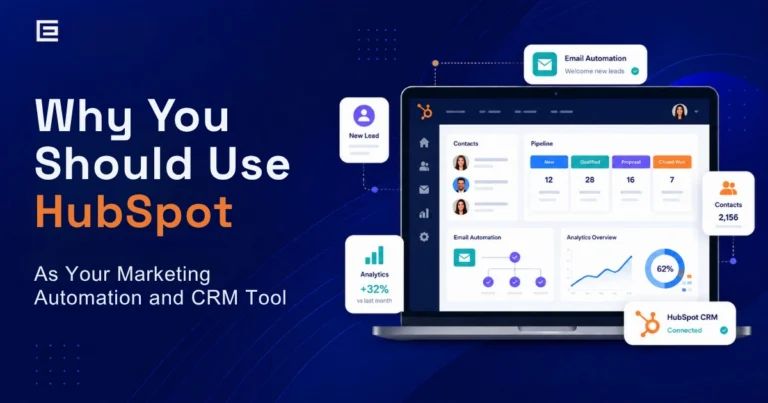
Now that you’ve attracted leads using marketing automation, the next step is organizing and tracking them while you work on converting them into paying customers. The HubSpot CRM streamlines this process by putting all relevant information in one central dashboard, no more scattered spreadsheets, missed follow-ups, or leads falling through the cracks.
With HubSpot, your sales team stops wasting time digging through inboxes and syncing tools that don’t talk to each other. Everything is accessible from one place, making it easy to see every lead, every interaction, and every open deal at a glance. And because the CRM is connected to your marketing automation, you can see the entire customer journey from first click to closed deal.
See Everything in One Place
HubSpot CRM lets you manage your pipeline quickly and easily. From the dashboard, you get an updated view of your sales funnel, see which deals you’ve won and lost, review scheduled appointments, and track performance against your goals. Every call, email, and meeting note lives in one neat timeline — no more digging through your inbox or trying to remember where a conversation happened.
The pipeline view is particularly valuable for service businesses. You can create custom deal stages that reflect your actual sales process, from “initial inquiry” to “proposal sent” to “contract signed”, and move contacts through each stage with a simple drag and drop. At any given moment, you can see exactly how many opportunities are in each stage, what the total potential revenue looks like, and which deals need attention before they go cold. That kind of visibility changes how you run your business.
Automatically Log Every Activity
HubSpot tracks all your interactions with customers and prospects automatically, calls, emails, social media exchanges, and form submissions. Sync your Gmail or Outlook account and every email is logged without lifting a finger. You’ll always know exactly where each lead stands in your pipeline and when they were last contacted.
This is especially valuable for teams where multiple people interact with the same prospect. When a lead calls in and speaks to someone other than their usual point of contact, that team member can pull up the contact record and see every previous interaction in seconds. No awkward “let me check with my colleague” moments. No leads who feel like they have to explain their situation from scratch every time they call. Just seamless, professional communication that builds trust and speeds up the sales cycle.
Respond to Leads Before They Go Cold
A Harvard Business Review study found that companies responding to leads within one hour are 7 times more likely to qualify them. HubSpot’s built-in notifications, automated workflows, and live chat tools make it possible to respond fast, even automatically, so your business is first in the door every single time a new lead comes in.
With HubSpot workflows, you can set up an automated SMS or email that fires within seconds of a form submission, even at 11pm on a Sunday. The lead gets an immediate response confirming you received their inquiry and telling them exactly when to expect a call. Your team gets a task notification to follow up during business hours. The lead feels taken care of. Your team never drops the ball. That combination is what separates businesses that consistently convert leads from those that constantly wonder where their leads went.
Real-Time Conversations With Prospects
Personalized, one-on-one conversations build relationships faster than any automated email. HubSpot CRM makes this easy with a free live chat tool and a universal inbox shared across your customer service, sales, and marketing teams. Everyone sees the same conversation history, so no one ever asks a prospect to repeat themselves.
HubSpot’s meeting scheduling tool takes this even further. Instead of the back-and-forth of finding a mutually available time, you share a link and the prospect books directly into your calendar based on your real-time availability. The meeting is automatically logged in the CRM, a confirmation email goes out, and a reminder fires 24 hours before. What used to take three or four emails now takes one click, and booked meetings are the fastest path from interested lead to closed deal.
Is HubSpot Right for Your Business?
Whether you’re a small business owner managing leads on your own or a growing team ready to scale, HubSpot has a tier that fits where you are right now. The free CRM is genuinely free and includes more capability than most businesses realize — contact management, forms, email marketing, live chat, meeting scheduling, and basic reporting, all at no cost.
The difference between businesses that get results from HubSpot and those that don’t usually comes down to one thing: setup. Most businesses use less than 20% of what HubSpot can actually do because they never had it configured correctly from the start. No workflows. No sequences. No automated follow-up. Just contacts sitting in a CRM that’s functioning as an expensive digital rolodex. That’s where a certified HubSpot partner makes all the difference.
Set up your CRM with a HubSpot Certified Partner
TheeDigital is a certified HubSpot partner. We help businesses set up HubSpot correctly, build automated workflows, and train teams to use the platform to its full potential. Want to see what HubSpot can do for your pipeline? Join our free HubSpot training on June 18 or schedule a free consultation with one of our HubSpot experts today.
Frequently Asked Questions
Yes, HubSpot’s CRM is genuinely free with no time limit. The free tier includes contact management, forms, email marketing, live chat, meeting scheduling, and basic reporting. Paid tiers (Starter, Professional, and Enterprise) unlock advanced automation, A/B testing, lead scoring, and deeper analytics. Most small and mid-sized businesses can get significant value from the free plan before needing to upgrade, and upgrading is easy when your needs grow.
HubSpot CRM is the free foundation that stores all your contacts, deals, and communication history. The Marketing Hub is a paid add-on built on top of the CRM that adds email automation, landing page builders, social media scheduling, lead scoring, campaign analytics, and A/B testing. Most businesses start with the free CRM and add Marketing Hub features as their lead generation needs grow.
HubSpot integrates with over 1,500 tools including Gmail, Outlook, Slack, Salesforce, Shopify, WordPress, Zoom, QuickBooks, and many more. The HubSpot App Marketplace makes it easy to connect the tools your business already uses so your data flows automatically without manual data entry.
A basic HubSpot setup, connecting your email, importing contacts, and creating your first form and pipeline — can be done in a few hours. A full setup with custom properties, automated workflows, email sequences, landing pages, and reporting dashboards typically takes one to two weeks depending on the complexity of your sales process. Working with a certified HubSpot partner significantly shortens this timeline and ensures everything is configured correctly from the start.
HubSpot is one of the best CRM and marketing automation tools available for small businesses specifically because of its free tier, ease of use, and scalability. You don’t need a developer, a large marketing team, or a big budget to get started. Many small businesses use the free CRM for years before upgrading, and the transition to paid tiers is smooth when the time comes.
A HubSpot certified partner is a digital marketing agency that has been vetted and certified by HubSpot for their expertise in implementing and optimizing the platform. They can help you set up HubSpot correctly from day one, build custom workflows and automation, train your team, and develop inbound marketing strategies that drive measurable results. Working with a certified partner like TheeDigital means you’re not figuring out the platform alone, you’re getting a team that has done this hundreds of times.
HubSpot is generally better suited for small to mid-sized businesses that need an all-in-one platform combining marketing, sales, and CRM without a large technical team or implementation budget. Salesforce is more powerful for large enterprises with complex, highly customized sales processes but requires significant technical expertise and investment to configure and maintain. Many businesses start with HubSpot and stay with it long-term because the platform scales well and the marketing automation tools are stronger than what Salesforce offers out of the box.
Tags: HubSpot • Inbound Marketing

Richard Horvath
Richard Horvath is the founder of TheeDigital, a Raleigh based award-winning web design and digital marketing agency. He is proud of his team and the results that they provide to their clients.