

Have you taken the time to decide what you want from a website? Is your company’s website simply an online business card or would you like it to do more? Does your current website truly represent your business? Your website might be the only asset that works for you 24 hours a day, 7 days a week, 365 days of the year. But have you ever measured its performance? A bad website can cost you clients, slow down your growth, and repel new job candidates.
It is important to have clearly defined objectives for what you want from a website. A few examples are:
- Grow your email subscriber list – What is the number one thing many of us do first thing in the morning? Check email is probably a common answer. Growing your subscriber list allows you to pitch potential clients and keep you in your customer’s mind.
- Show up for certain search terms – Are you showing up in search engine results for the queries your customers are entering? It’s not enough to assume you know what search term your customers are using. A professional can help you find out what search term converts best for you and should be targeted.
- Get leads – Are customers contacting you through your website? If they are contacting you, are you hearing from as many of them as you could?
At your company, reassessing and replacing bad, old, or outdated parts of your business should come naturally. If equipment breaks down or performs badly, you replace it with something better. When a better process is presented to you or your current process is holding the company back, you reassess and pursue a different course of action. But have you considered turning this same mode of thinking towards your company website? You definitely should, because in today’s digital world, an outdated website could be costing you big time. Read further to learn exactly why.

- You’re Losing Revenue Because of Your SEO
- Your Platform Makes SEO Impossible
- Your Site Loads Slowly
- Cheap Hosting
- How Do You Know if Your Website Isn't Performing?
- Your Website is Not Responsive or Mobile-Friendly
- Your Site Can Be Easily Hacked
- You’re Losing Revenue Because Your Site is Repelling Customers
- Your Website is Outdated or Old-Looking
- Your Website is Hard to Navigate
- Long contact forms
- Your Website Doesn’t Deliver on Its Promises
- No Call to Action
- What the Best Website Do Differently
But I Don’t Want to Update My Website
It can be easy (and sometimes justified) to leave your website alone and let it get older and outdated. You may think:
- “I feel like we just redesigned it a few years ago.”
- “It cost us a bunch of money the last time.”
- “We just have one because we felt like we should – most of our business comes from referrals anyway.”
Unfortunately, the more outdated your website becomes the more it could be costing you revenue. If you’re reading this article, it should come as no surprise that how the world gets its information has fundamentally changed – people now use the internet to make most, if not all, of their large decisions and purchases, even for their businesses. This makes your company’s website and online presence critical to being successful as technology moves ever forward. You could be making much more money than you’d think.
Even worse, when your site is outdated, old, or not even able to be updated, it’s not just a neutral non-entity of your business that you don’t happen to be working on. It can actively hurt your ability to grow as a business by turning away clients, potential employees, or even making it hard for your company to be found on the internet.
There are two major ways in which your website could be costing you money: either you can’t be found, or when you are found, you’re repelling customers.
You’re Losing Revenue Because of Your SEO
Search engine optimization (SEO) is a catchall term for a variety of optimization tactics that help your website rank well in search engines. Unless you have no competitors at all, SEO for your website is necessary to help your rank. When your website is older or out of date, the more it can affect your SEO: either from being on a platform that makes SEO impossible, from being slow, from being non-responsive or not mobile-friendly, or from the heightened risk of being hacked. Here are these points explained more in detail:
Your Platform Makes SEO Impossible
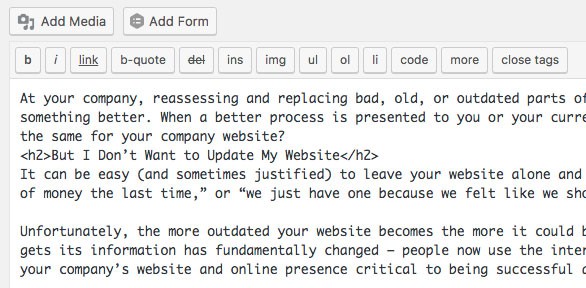
Ask yourself or your staff this question: if you wanted to change something on the website as it is now, could you? Do you have a webmaster who makes updates for you? Has your website been static for some time? Can anyone access the site at all?
If it’s been several years since you built your website, it might be so old that the user interface doesn’t relate to how websites are designed currently (see: web design trends 2026), doesn’t work anymore, or no one at your company can remember how to log in and change anything. It might be also that your site was built on a platform that makes it hard for even experienced search engine optimizers to attempt to optimize the site.
Being able to update information and add content is fundamental to SEO and for your site to be searchable. When your site is so old or built on such a bad platform, no one is going to find your business.
How Can I Tell if My Website’s Platform is Outdated?
Ask yourself and your staff the following question: have we logged in and changed anything in the last month? Six months? Year or more? The longer that period is, the more likely your site is outdated and that goes double if no one can remember the logins to get into the website.
Your Site Loads Slowly

Slow-loading websites are infuriating. You’ve likely experienced navigating to a website and having to wait for ages for it to finally load, or worse, you think it’s loaded and go to click – but the page jumps because something else finally loaded.
However, slow loading times on your company’s website aren’t just bad for your visitors, it’s bad for rankings, too. Search engines like Google want to show the very best websites to people that use their search function – if they show websites to their users that are slow and take way too long to load, their users can get frustrated with their services and choose Bing or Yahoo instead for their searches.
This means that if your site loads slowly, Google has started to prioritize other websites over yours. As your competitors update and refresh their websites, they’ll get faster, essentially leaving you behind while yours gets slower. Eventually your site may be pushed down to the second or third pages of results and that’s certainly not good considering sites ranking on page 1 see nearly 95% of traffic.
How Can I Tell if My Website is Too Slow?
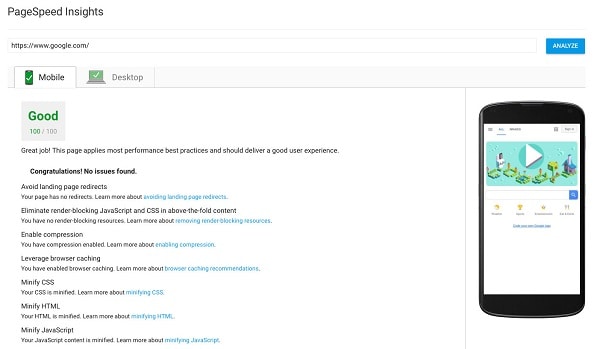
The easiest method is to use Google’s PageSpeed Tool: type in the URL of your website and click “Analyze.” This will give you an analysis of the speed of your website from Google themselves. Hint: if the number they give you is lower than 60, you need to consider a website redesign.
Cheap Hosting
Everyone loves saving money. But did you know that your $5 per month web hosting could be affecting your search engine results?
Pages with a longer load time tend to have higher bounce rates and lower average time on page. Research by Moz has shown that Google looks at time to first byte (TTFB) as a ranking factor for search engine results. The optimal server response time is under 200ms. Use a tool like WebPageTest to measure your TTFB.

How Do You Know if Your Website Isn’t Performing?
The best way to find out if your website is underperforming is to gather and dissect user data. There are many tools and ways to accomplish this.
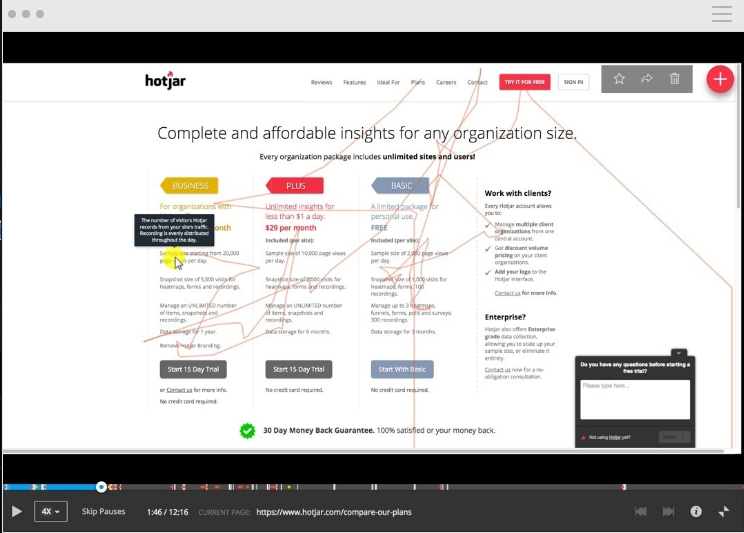
Hotjar is a service you can add to your website that allows you to see your user’s behavior, and create heat maps and recordings of real website visitors navigating your site. This is valuable data that can help you identify website weakness and improvements.
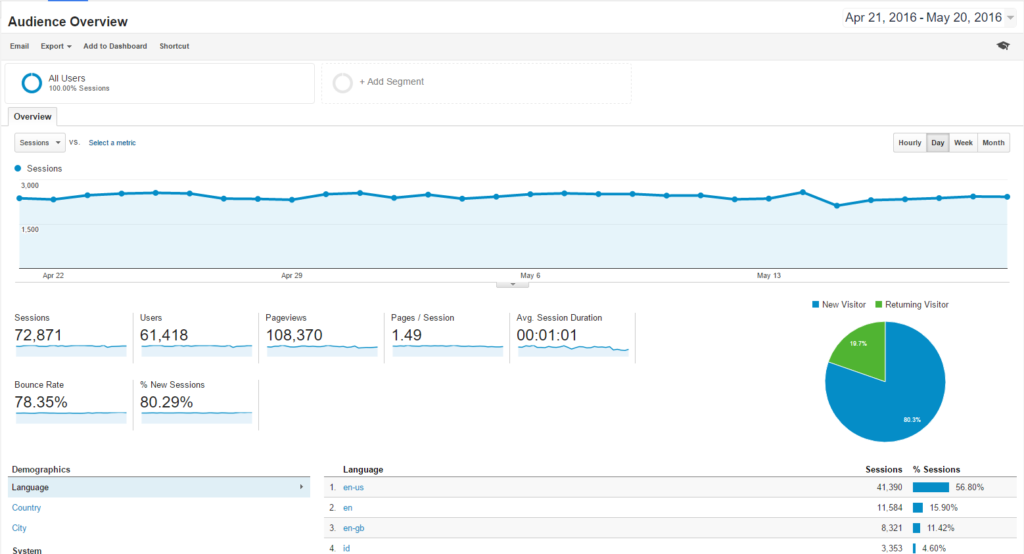
Google Analytics is a free solution that can show you information like bounce rate, behavior flow, and user acquisition.
Your Website is Not Responsive or Mobile-Friendly

The last time you designed your site, your designers probably threw around the terms “mobile responsive” or “mobile-friendly.” These are terms that describe sites that react and resize themselves to navigation on mobile devices like tablets and smartphones.
Mobile responsive sites started to become popular with the similar rise in, you guessed it, mobile devices and mobile browsing. However, over the last several years mobile responsive sites have gone from an option to a need.
In 2015, the majority of internet traffic finally went from desktop to mobile, and that in turn changed how Google ranks sites. Remember what we said about how Google prioritizes sites that load quickly over slow sites? It’s a similar priority with sites that are mobile-friendly or mobile responsive. Google prioritizes mobile sites over desktop-only sites, making it harder and harder for your non-mobile-friendly site to be found.
How Can I Tell if My Website is Mobile Responsive or Mobile-Friendly?
Get out your smartphone and pull up the site on your phone’s browser. If everything is tiny, if you have to zoom in to look at anything and navigate, and if all of the links are hard to select with your fingers – essentially, if it looks like the desktop site but shrunken – your site is not mobile-friendly or responsive.
Your Site Can Be Easily Hacked
The 1996 cult movie Hackers promised us that in the future we’d be overrun by punk cyberterrorists from Manhattan, and while wearing lycra and using dial-up internet hasn’t stuck around, hackers are still a potential threat to your website. In fact, according to Google’s data, hacked sites were up 32% in 2016 and are expected to increase in 2017.
What exactly is a hack? If your company site has been hacked, it means that someone has gained access to your site illicitly and with the intent to install malicious code on your site, on other’s computers, and to even hold the website for ransom.
These hacks can be achieved several ways, but one of the easiest ways to let your site be hacked is either through giving out private security information to unverified parties or by letting your site get old, making it easier to hackers to get past its security protocols.
So what does getting hacked have to do with being shown in the search engines? Due to this rise in hacked websites, Google has started to prioritize secured websites over unsecured ones. Websites can be secured with the installation of an SSL certificate, which encrypts the data on your site via a secure remote server, and protects both you and your visitors’ sensitive information. This is why 2017 was referred to sometimes as the “year of SSL certificates” as Google again has started to prioritize websites that have an SSL certificate over other, unsecured sites.
How Can I Tell if My Website Has an SSL Certificate?
Hopefully, you’d remember asking your IT department to have the SSL installed, but the easiest way to tell is if you look at the URL – if it says “https” at the beginning instead of just “http” you have an SSL certificate installed.
You’re Losing Revenue Because Your Site is Repelling Customers
Somehow, through either luck or magic, your outdated website might actually have enough SEO juice to get listed on the first page of Google or other search engines. This is great news – except for the fact that once people click on your site, they say “nope” and back out of your website to look for someone else. Out of date or ugly websites can repel visitors for several reasons, either because the old look is off-putting, it’s hard to navigate the site, or the site doesn’t provide the answers for which they were looking.
Your Website is Ugly or Old-Looking
Appearance is important, even if it might be unpopular to say so. If you went to hire someone to do a job and they showed up in dirty clothes with bloodshot eyes and smelling like gin, it probably wouldn’t matter how great their resume looked. Even in professions where you have to get down in the grime and muck, it’s still expected that they at least wear a uniform or to look presentable during the interview.

Such is the same when it comes to the appearance of your website. If your site looks old or ugly, your potential customers will not want to engage with you no matter how great your deals are or how compelling your content is. Your site must be an extension of your professionality and keeping everything modern and fresh are aspects of that.
This goes double for businesses who have updated the look and appearance of their brand otherwise but not their website. Consumers expect a flawless transition between all branches of your marketing materials, which means that the sign outside your building, the ads you purchase, the commercials you run, the business cards you give out, and especially your website should all look as though they go together. Not updating your website with your rebranding is the equivalent of getting dressed for a big business meeting and forgetting to put on pants.
How Can I Tell If My Website Looks Outdated?
Sometimes these things come down to personality or taste, but compare your site to your competitors’ sites, especially if one of them has updated their site. Does it look more inviting and engaging? Is it easier to read? Are you envious of how their’s looks? Are you loath to give customers your URL? If so, you might have an ugly website.
Your Website is Hard to Navigate
Website navigation is tricky: when it’s great, you don’t notice it and when it’s bad, it ruins everything else. Bad or broken navigation on your website means that your users can’t get to the information that they want or can’t get back to pages that they’ve already seen.

When we talk about navigation in this context, we’re talking about the links on the page that help users get from one page to another. A well-designed navigation will have sticky menus that hold the more important links on the site on every page and will properly display the parent pages if you’ve navigated through several levels of content. It’s all about appearing organized, structured, and giving your users a roadmap to your website.
Even more common on older, outdated websites are broken links. These occur from a multitude of reasons – either content gets moved to a new URL and the links aren’t redirected or an update occurs that messes up how the links were put in. Either way, a website that’s full of broken links is dramatically unappealing to a user, who will likely back out and go find another company.
How Can I Tell if My Website is Hard to Navigate?
Ask a friend who has never used your site to try it out and find something on the page. They’ll tell you pretty quickly if it’s hard to use or navigate through your site.
Long Contact Forms
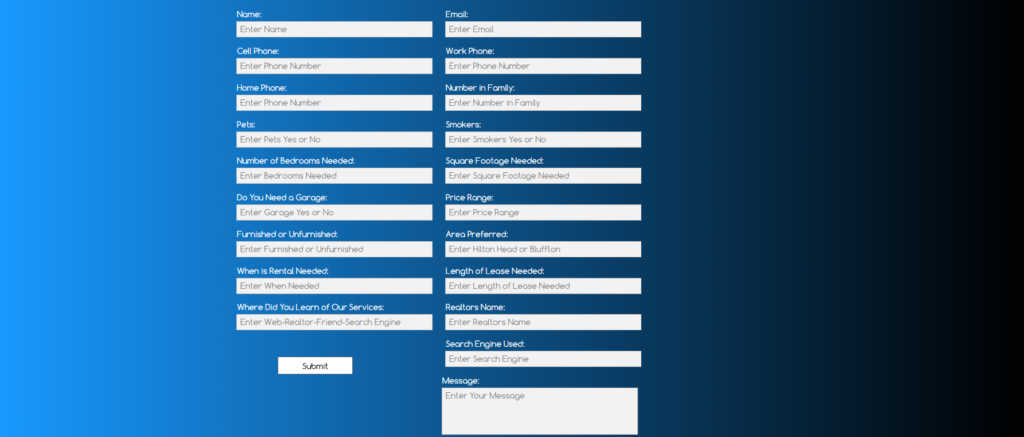
Long contact forms with a lot of fields to fill in lead most people to leave a page. Data shows shorter forms convert better. See the below image of a long website form.
Now see the Google Analytics data for this page.
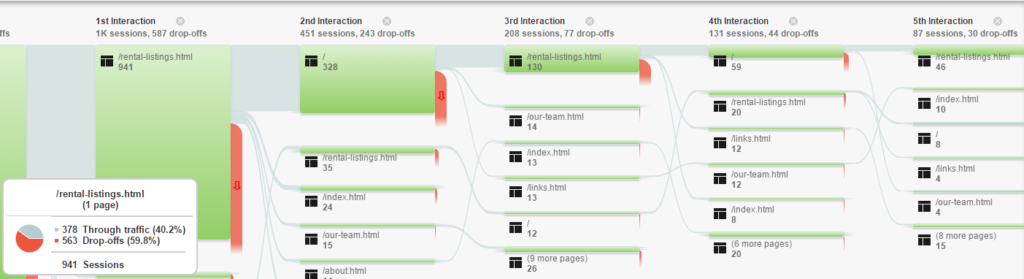
In the above example, almost 60% of users leave the website when encountering this form. Out of the 941 visitors who made it to this page, only 50 visitors filled out the form. In the above example you can see visitors bouncing back and forth between the homepage and the contact form but ultimately leaving the site.
The purpose of this form is for visitors to contact the company, but visitors are ultimately discouraged by the lengthy contact form. Does your website have a way for visitors to easily contact you?
Your Website Doesn’t Deliver on Its Promises
Few things are more frustrating than being promised something and then that person not following through on it. In the same way, if the content on your website doesn’t provide value to the customer or promises answers that it doesn’t provide, that creates negative emotions associated with your company and brand.
Here’s an example: suppose you’d clicked on an article titled “Is Your Outdated Website Costing You Revenue?” Based on the title, you’d expect that the article would tell you at least the ways in which an outdated website would cost your business revenue and why, right? But if you clicked on that article and all it said was “older websites will cost you revenue, but if you contact us, we’ll make you a better website!” you would feel cheated and as though you were only being sold something – this leaves the user with negative feelings towards your company.
Outdated or bad content on your site can potentially draw people in, but it can repel them just as quickly. Even worse, if your site shows that it’s been a while since it was updated, it’s clear to anyone that you aren’t trying when it comes to your website’s content. It makes it easy for your customers to wonder what the status of your business is or if you’re even open anymore.
Nobody wants to hire the company that’s behind the times, and when your website is older-looking with outdated platforms or trends from five or six years ago, it makes your business look unknowledgeable and out-of-date.
How Can I Tell if My Website’s Content is Out of Date?
If you know your site hasn’t been updated in a while, say six months or longer, then it’s pretty safe to say that it’s out of date. However, if your industry’s processes tend to change over time, it’s always a good idea to reread your content periodically to check if anything is incorrect.
No Call To Action
Do your web visitors know what they should be doing once they reach your website? Use calls to action to direct your website visitors to the desired behavior. An effective call to action should tell readers that clicking on a link or image will get them what they want or need.
What the Best Websites do differently
- They make their value clear – Take care to make sure your main headings (H1) and marketing copy clearly show visitors what you do and how you can help them. First impressions are formed quickly. Have a clear headline, and test results.
- They tend to have short forms – Limit your contact form to only the essential fields. Respect your user’s time and sanity. Nobody wants to fill out 20+ fields just to hear back from you. Your user wants to contact you. Make it as easy as possible for them to do so.
- They take mobile visitors seriously – With mobile visitors making up over 50% of site visits, many sites are now making decisions with mobile visitors first in mind. If you aren’t giving customers what they want while on their phone or tablet, you’re losing them to brands that do.
- They hire a professional – Not everyone knows how to parse through user data and run heatmaps, and most people don’t stay up-to-date on the latest web trends. Not everyone can hire a full-time employee to manage these things. That’s why many websites rely on an experienced web agency like TheeDigital to help them realize their full web potential, identify improvements, and make more money. Your website might be losing you business, when it should be one of the most valuable tools in your business.
If the list above feels overwhelming, here’s the good news: the fixes aren’t complicated websites that consistently convert visitors into customers tend to do the same things well.
They make their value obvious immediately. A visitor should understand what you do and how you can help them within seconds of landing on your site. If your homepage headline is vague or generic, you’re losing people before they ever scroll.
They make it easy to take the next step. Every page should have a clear call to action — whether that’s contacting you, scheduling a consultation, or downloading a resource. If a visitor finishes reading a page and doesn’t know what to do next, that’s a design problem.
They keep forms short. Nobody wants to fill out 15 fields just to ask you a question. The best-converting websites limit contact forms to only the essentials and respect the visitor’s time.
They treat mobile as the default, not an afterthought. With mobile traffic making up more than half of all web visits, the strongest websites are designed for phones first and desktops second.
They treat their website like a business tool, not a digital brochure. The companies getting the most from their websites are measuring performance, reviewing data, and making improvements — not launching a site and forgetting about it for three years.
If any of the issues in this article sound familiar, you’re not alone — and you don’t have to figure it out yourself.

Is My Website Outdated?
Coming to terms with your website’s performance issues is similar to being honest with yourself, it’s hard to do but very healthy. Updating the look, the SEO, and the content of your site can have significant and positive results on your revenue, but the changes need to be made for that to happen.
Updating your outdated website doesn’t need to be a difficult experience. The web designers at TheeDigital have the experience and skills to help your website properly reflect your brand. Contact them today at 919-341-8901 or schedule a complimentary consultation.
Tags: Web Design
Richard Horvath
Richard Horvath is the founder of TheeDigital, a Raleigh based award-winning web design and digital marketing agency. He is proud of his team and the results that they provide to their clients.